
You open your laptop on Monday morning with three things on your plate: a quarterly sales summary, a competitor brief, and a proposal draft for a new prospect. Any one of those tasks will eat two hours of your day.
ChatGPT Work, launched by OpenAI on July 9, 2026, is designed to change that. Unlike the chatbot you may already use for quick answers, ChatGPT Work is an agent that takes a goal, gathers context from your connected business applications, and returns finished work: a completed spreadsheet, a polished slide deck, or a document ready for your review.
This article breaks down what ChatGPT Work actually does, which tasks SMB owners can automate today, and how to get started.
What Is ChatGPT Work?
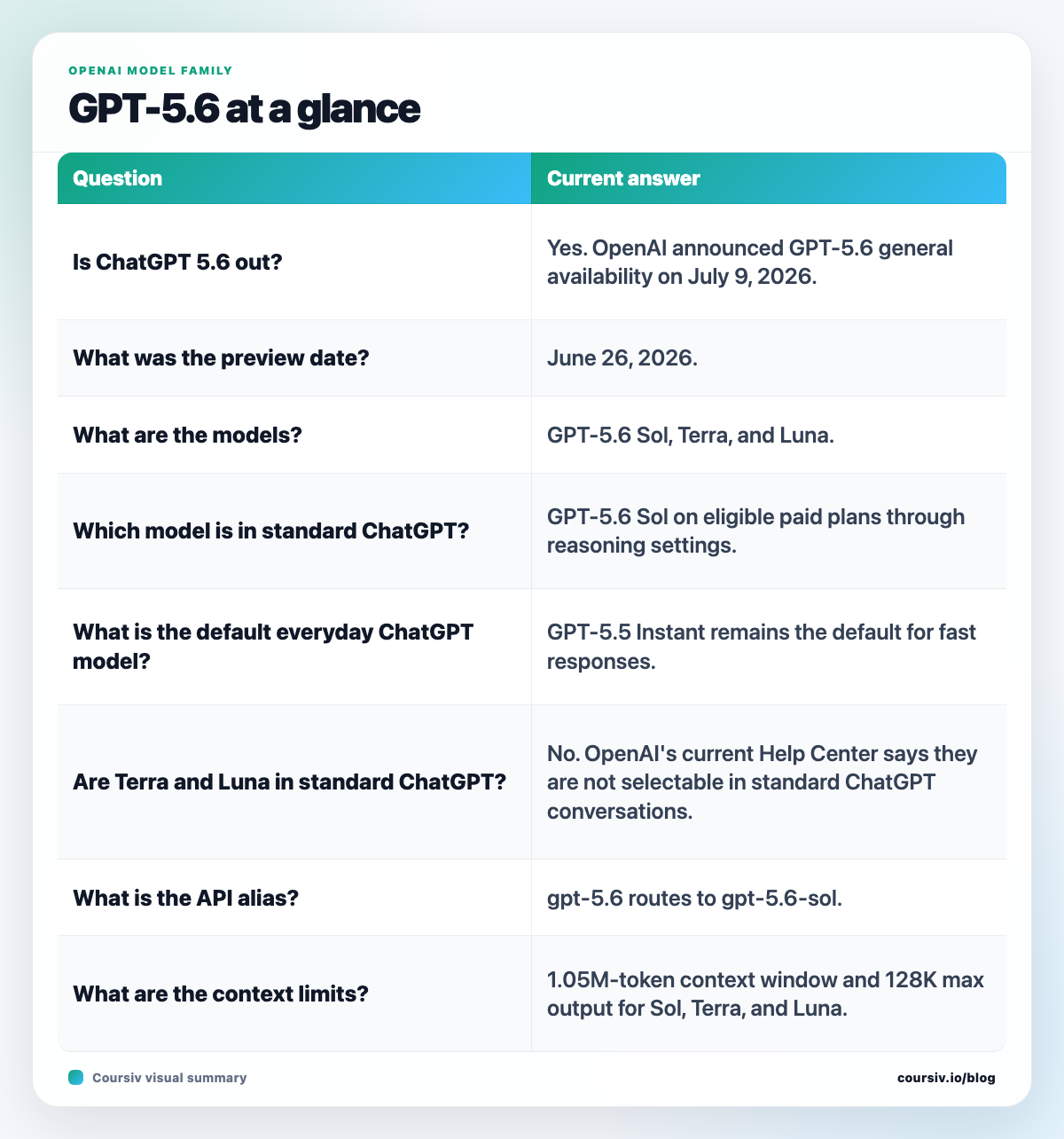
ChatGPT Work is OpenAI’s new workplace agent, launched July 9, 2026 alongside the GPT-5.6 model family. The difference from standard ChatGPT is fundamental: instead of a conversation partner, you get an autonomous agent that stays with a complex project for hours.
You give it an outcome – prepare my Q2 performance summary using the files in my Google Drive – and it gathers context from your connected apps, breaks the work into steps, completes each one, and delivers a finished artifact: a Google Doc, spreadsheet, slide deck, or interactive web app.
Under the hood, GPT-5.6 comes in three tiers:
- Sol – flagship performance for complex, multi-step tasks
- Terra – balanced speed and quality for everyday work
- Luna – fastest and most cost-efficient for routine jobs
OpenAI CEO Sam Altman noted that Sol is 54% more token-efficient on agentic coding tasks than prior models.
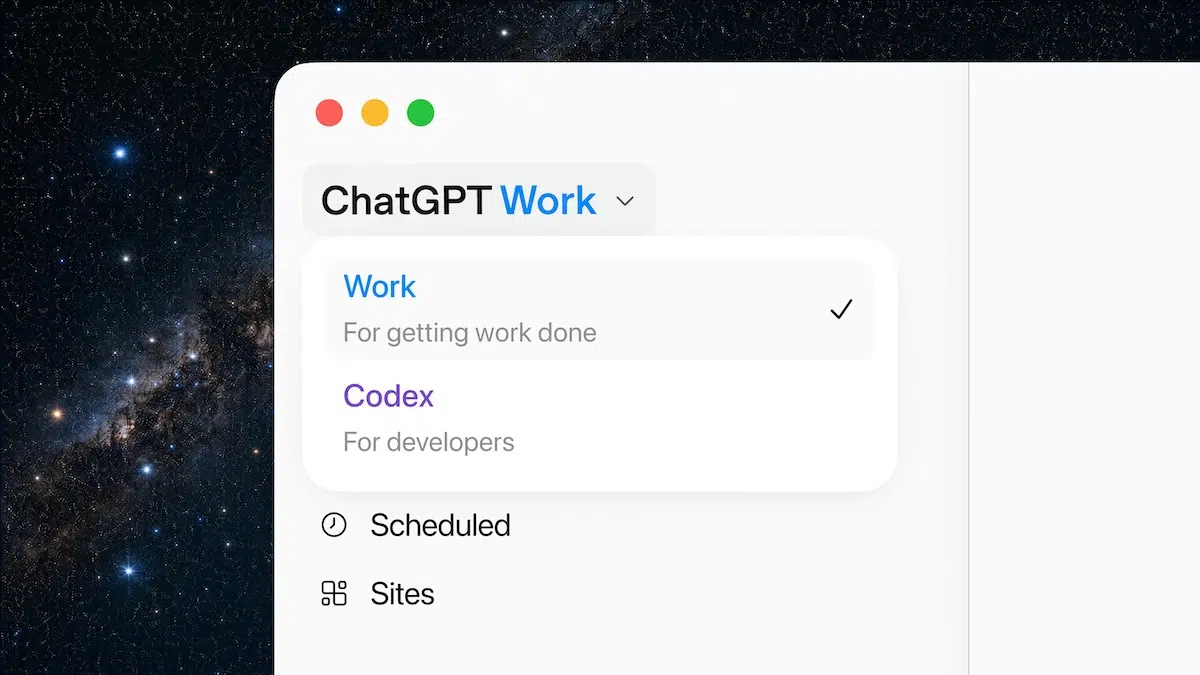
The Codex app – OpenAI’s code agent – is also merging into the new ChatGPT desktop app, putting chat, autonomous work, and coding assistance into a single tool.
5 Business Tasks You Can Delegate to ChatGPT Work This Week
ChatGPT Work connects to the tools most SMBs already use: Gmail, Outlook, Google Drive, SharePoint, Dropbox, Box, Notion, Slack, GitHub, and Salesforce. That means it works from your real files and real context – not a blank prompt.
Here are five tasks worth testing this week:
1. Weekly business reports
Connect Google Drive and ask ChatGPT Work to pull the latest sales data, summarise the key trends, and produce a formatted Google Doc. What used to take an hour on Friday morning becomes a scheduled task that lands in your inbox automatically.
2. Competitor research briefs
Give it a competitor name and an outcome: Research their pricing, recent product updates, and customer reviews. Write a two-page brief. ChatGPT Work has a built-in browser for web research, so it goes beyond what is already in your files.
3. Client proposal first drafts
Pull from previous proposals stored in Drive or Notion, adapt the template for a new client brief, and receive a finished document ready for your review. You QA and adjust; ChatGPT Work handles the first draft.
4. Spreadsheet summaries
Connect it to your financial files and ask for a monthly expenses breakdown or revenue summary formatted as a spreadsheet. No formulas to write. No copy-paste from five different files.
5. Pre-meeting client briefings
Before a client call, ask it to gather recent emails from Gmail or Outlook, combine them with project notes from Notion, and produce a one-page briefing document. Thirty seconds to request, five minutes to deliver.
Who Gets Access and What Does It Cost
ChatGPT Work is rolling out to Pro, Pro Lite, Enterprise, and Edu plan users first, with Plus and Business users following shortly after the July 9 launch. The free tier does not include ChatGPT Work.
For developers building with the API, GPT-5.6 is priced per million tokens:
- Sol: $5 input / $30 output
- Terra: $2.50 input / $15 output
- Luna: $1 input / $6 output
ChatGPT Work uses a metered credit model for tasks rather than a flat monthly rate. Before scheduling recurring tasks, run a few manually and check what each one costs. There is no flat-fee safety net.
How AppCoders Can Help You Go Further
ChatGPT Work handles one-off tasks well. But if you want that to happen automatically every week – without you pressing a button – you need integration work: connecting your CRM, setting up scheduled triggers, routing the output to the right person, and making sure the data it pulls is clean.
At AppCoders, we build AI agents that connect to your actual business stack and run on autopilot. If you want to turn ChatGPT Work (or a similar tool) into a hands-free back-office layer, book a free call with us.
Conclusion
ChatGPT Work represents a meaningful shift in what business owners can delegate to AI. Moving from answering questions to completing tasks is not a minor update – it changes what you can remove from your plate entirely.
Start with one repeatable task this week. Connect one data source, give it an outcome, and review the result. If it saves you an hour, you have found your first automated workflow.
Want a complete AI operations layer for your business? Contact AppCoders here.